

We are using a few automations based on Azure Functions, some based on Python, others on PowerShell. Recently we have encountered some issues with one automation running on a Consumption based function with PowerShell. The function is querying the API of our back-office system for some analytics and has been timing out after the 10 Minutes, which also is the maximum Duration of a Consumption based function.
As the Consumtion based plan is on the way to retirement, we migrated to Flex Consumption which is the new way to go. But as Flex Consumption is only running on Linux (no Windows anymore) and our Function needed some specific Windows Libraries we decided to migrate the whole function to Python and that’s where our adventure started.
So we changed all the Code and commited to Github to deploy with a Workflow to the Function. This is pretty easy at first, as Azure can create the whole Workflow directly from the Deployment Center. This left us with the following information in the Deployment Center:
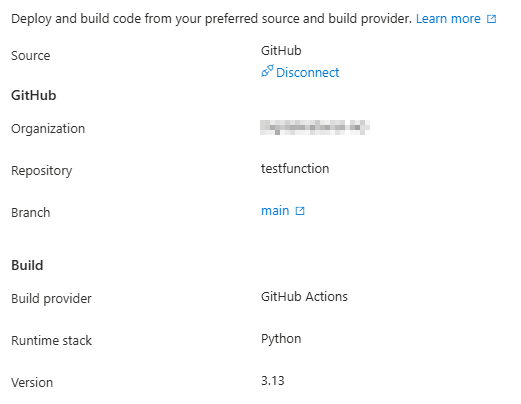
And the following Flow in Github Workflow:
name: Build and deploy Python project to Azure Function App - dgmttestfunction

on:
  push:
    branches:
      - main
  workflow_dispatch:

env:
  AZURE_FUNCTIONAPP_PACKAGE_PATH: '.' # set this to the path to your web app project, defaults to the repository root
  PYTHON_VERSION: '3.13' # set this to the python version to use (supports 3.6, 3.7, 3.8)

jobs:
  build:
    runs-on: ubuntu-latest
    permissions:
      contents: read #This is required for actions/checkout

    steps:
      - name: Checkout repository
        uses: actions/checkout@v4

      - name: Setup Python version
        uses: actions/setup-python@v5
        with:
          python-version: ${{ env.PYTHON_VERSION }}

      - name: Create and start virtual environment
        run: |
          python -m venv venv
          source venv/bin/activate

      - name: Install dependencies
        run: pip install -r requirements.txt

      # Optional: Add step to run tests here

      - name: Zip artifact for deployment
        run: zip release.zip ./* -r

      - name: Upload artifact for deployment job
        uses: actions/upload-artifact@v4
        with:
          name: python-app
          path: |
            release.zip
            !venv/

  deploy:
    runs-on: ubuntu-latest
    needs: build
    permissions:
      id-token: write #This is required for requesting the JWT
      contents: read #This is required for actions/checkout

    steps:
      - name: Download artifact from build job
        uses: actions/download-artifact@v4
        with:
          name: python-app

      - name: Unzip artifact for deployment
        run: |
          unzip release.zip
          rm release.zip

      - name: Login to Azure
        uses: azure/login@v2
        with:
          client-id: ${{ secrets.AZUREAPPSERVICE_CLIENTID }}
          tenant-id: ${{ secrets.AZUREAPPSERVICE_TENANTID }}
          subscription-id: ${{ secrets.AZUREAPPSERVICE_SUBSCRIPTIONID }}

      - name: 'Deploy to Azure Functions'
        uses: Azure/functions-action@v1
        id: deploy-to-function
        with:
          app-name: 'dgmttestfunction'
          slot-name: 'Production'
package: ${{ env.AZURE_FUNCTIONAPP_PACKAGE_PATH }}Now if we ignore the fact, that the Actions used are pretty old actions/checkout is currently at v6, actions/upload-artifact at v7 this looks pretty good, but if we look at our Function we see the following error:
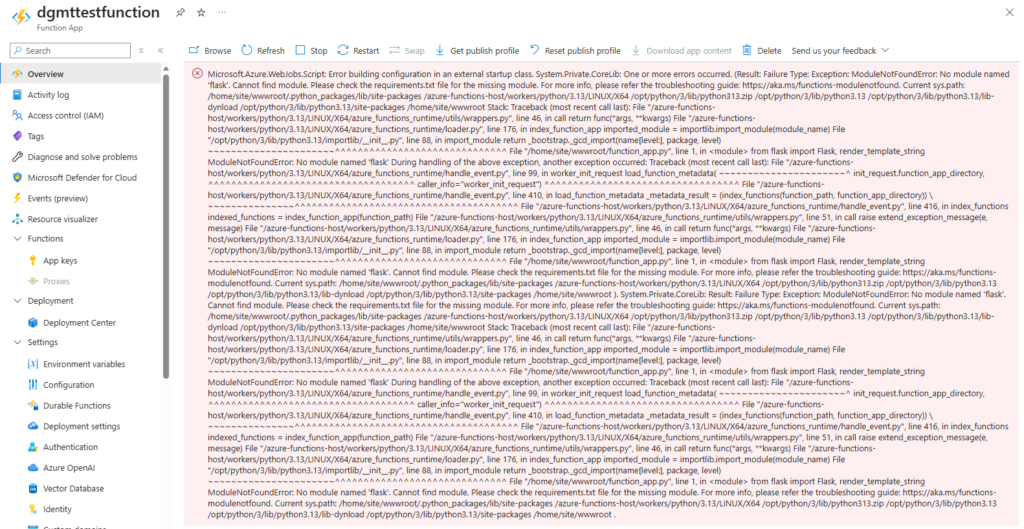
The error message is quite clear:
File "/home/site/wwwroot/function_app.py", line 1, in from flask import Flask, render_template_string ModuleNotFoundError: No module named 'flask'. Cannot find module. Please check the requirements.txt file for the missing module. But our requirements.txt looks like this (in this Test-Function)
flaskSo the current issue is, that the Modules are not shipped to the Azure Function. But looking at the Logs of the Action, this looks fine:
Run pip install -r requirements.txt
Collecting flask (from -r requirements.txt (line 1))
  Downloading flask-3.1.3-py3-none-any.whl.metadata (3.2 kB)
Collecting blinker>=1.9.0 (from flask->-r requirements.txt (line 1))
  Downloading blinker-1.9.0-py3-none-any.whl.metadata (1.6 kB)
.................
Installing collected packages: markupsafe, itsdangerous, click, blinker, werkzeug, jinja2, flaskBut when we look a bit closer, the next Step (Zip artifact for deployment) does not pack the file. We can see every files that gets packed, but no Modules what we installed into the venv. Also if we download and open the Artifact, there is no Flask to be found.
This suggested that the virtual environment did not persist between steps. So we tried to activate the venv before installing and zipping the requirements. That means our Install dependencies and Zip artifact for deployment steps now looks like that
      - name: Install dependencies
        run: |
          source venv/bin/activate
          pip install -r requirements.txt

      - name: Zip artifact for deployment
        run: |
          source venv/bin/activate
zip release.zip ./* -rAnd we can see that the dependencies are packed into the Artifact:
adding: venv/bin/flask (deflated 31%)gAnd we can see the dependency in the artifact that is beeing created:
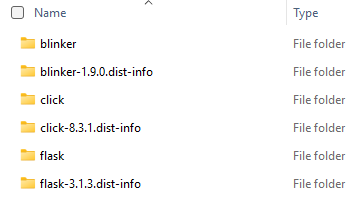
But this did not resolve our issue as the Function still was not able to load the modules:

So after quite some time (and possibly some cursing) we have found two solutions:
Solution 1: Remote Build
So no luck with the venv and Shipping the Modules, thats why we tried the next thing. Let Azure Function install the dependencies from the requirements.txt. This is documented by Microsoft: Deployment technologies in Azure Functions | Microsoft Learn
For Linux Consumption, Elastic Premium, and App Service plans you will need to set the following environment variables:
ENABLE_ORYX_BUILD=true
SCM_DO_BUILD_DURING_DEPLOYMENT=trueBut for Python Apps on Flex Consumption this is not required and supported, we just need to request a remote build:
When deploying to the Flex Consumption plan, you don’t need to set any application settings to request a remote build. You instead pass a remote build parameter when you start deployment. How you pass this parameter depends on the deployment tool you’re using. For Core Tools and Visual Studio Code, a remote build is always requested when deploying a Python app.
So we change our Deploy to Azure Functions deploy step and add the remote-build: true and remove the whole Create and start virtual environment and Install dependencies steps.
      - name: 'Deploy to Azure Functions'
        uses: Azure/functions-action@v1
        id: deploy-to-function
        with:
          app-name: 'dgmttestfunction'
          slot-name: 'Production'
          package: ${{ env.AZURE_FUNCTIONAPP_PACKAGE_PATH }}
remote-build: trueAnd voila. The deployment succeeds, we do not get any errors in the function and are able to access our awesome App:

This is the full workflow-file that is working now:
name: Build and deploy Python project to Azure Function App - dgmttestfunction
on:
push:
branches:
- main
workflow_dispatch:
env:
AZURE_FUNCTIONAPP_PACKAGE_PATH: '.' # set this to the path to your web app project, defaults to the repository root
PYTHON_VERSION: '3.13' # set this to the python version to use (supports 3.6, 3.7, 3.8)
jobs:
build:
runs-on: ubuntu-latest
permissions:
contents: read #This is required for actions/checkout
steps:
- name: Checkout repository
uses: actions/checkout@v4
- name: Setup Python version
uses: actions/setup-python@v5
with:
python-version: ${{ env.PYTHON_VERSION }}
- name: Zip artifact for deployment
run: zip release.zip ./* -
- name: Upload artifact for deployment job
uses: actions/upload-artifact@v4
with:
name: python-app
path: |
release.zip
!venv/
deploy:
runs-on: ubuntu-latest
needs: build
permissions:
id-token: write #This is required for requesting the JWT
contents: read #This is required for actions/checkout
steps:
- name: Download artifact from build job
uses: actions/download-artifact@v4
with:
name: python-app
- name: Unzip artifact for deployment
run: |
unzip release.zip
rm release.zip
- name: Login to Azure
uses: azure/login@v2
with:
client-id: ${{ secrets.AZUREAPPSERVICE_CLIENTID }}
tenant-id: ${{ secrets.AZUREAPPSERVICE_TENANTID }}
subscription-id: ${{ secrets.AZUREAPPSERVICE_SUBSCRIPTIONID }}
      - name: 'Deploy to Azure Functions'
        uses: Azure/functions-action@v1
        id: deploy-to-function
        with:
          app-name: 'dgmttestfunction'
          slot-name: 'Production'
          package: ${{ env.AZURE_FUNCTIONAPP_PACKAGE_PATH }}
remote-build: trueSolution 2: Install without venv
The other working solution we have found was to ditch the venv and install the Python Modules during the build process directly into the current folder. Meaning we remove the Create and start virtual environment step and change the Install dependencies step to the following and we need to update the zip command to include folder starting with a dot
      - name: Install dependencies
        run: pip install --target="./.python_packages/lib/site-packages" -r requirements.txt

      - name: Zip artifact for deployment
run: zip release.zip ./ -rThis installs the Python Modules during the build process, packs it into the artifact and ships it to the Azure Function. Just without the venv. And this works with the following workflow:
name: Build and deploy Python project to Azure Function App - dgmttestfunction
on:
push:
branches:
- main
workflow_dispatch:
env:
AZURE_FUNCTIONAPP_PACKAGE_PATH: '.' # set this to the path to your web app project, defaults to the repository root
PYTHON_VERSION: '3.13' # set this to the python version to use (supports 3.6, 3.7, 3.8)
jobs:
build:
runs-on: ubuntu-latest
permissions:
contents: read #This is required for actions/checkout
steps:
- name: Checkout repository
uses: actions/checkout@v4
- name: Setup Python version
uses: actions/setup-python@v5
with:
python-version: ${{ env.PYTHON_VERSION }}
      - name: Install dependencies
        run: pip install --target="./.python_packages/lib/site-packages" -r requirements.txt

      - name: Zip artifact for deployment
        run: zip release.zip ./ -r
- name: Upload artifact for deployment job
uses: actions/upload-artifact@v4
with:
name: python-app
path: |
release.zip
!venv/
deploy:
runs-on: ubuntu-latest
needs: build
permissions:
id-token: write #This is required for requesting the JWT
contents: read #This is required for actions/checkout
steps:
- name: Download artifact from build job
uses: actions/download-artifact@v4
with:
name: python-app
- name: Unzip artifact for deployment
run: |
unzip release.zip
rm release.zip
- name: Login to Azure
uses: azure/login@v2
with:
client-id: ${{ secrets.AZUREAPPSERVICE_CLIENTID }}
tenant-id: ${{ secrets.AZUREAPPSERVICE_TENANTID }}
subscription-id: ${{ secrets.AZUREAPPSERVICE_SUBSCRIPTIONID }}
- name: 'Deploy to Azure Functions'
uses: Azure/functions-action@v1
id: deploy-to-function
with:
app-name: 'dgmttestfunction'
slot-name: 'Production'
package: ${{ env.AZURE_FUNCTIONAPP_PACKAGE_PATH }}Conclusion
So we had to learn that the default workflow created by Azure does not only use some old versions of the Actions (which is an issue Dependabot can solve) they also don’t seem to work well with Flex Consumption. There are two working solutions:
- Use Remote Build: Only ship the requirements.txt to the Function and let the Function install the dependencies. This leads to very small artifacts.
- Install Modules without the venv: Install the Modules using pip during the Build Process and Ship the Modules to the Function
Schreiben Sie einen Kommentar