
In regard to the upcoming timeline for certificate lifetimes, services like RPTG are getting more labour-intensive if certificates are continued to be manually deployed. To solve this issue, we’ve created a script which can be run as a scheduled task. This guide is specifically for using Posh-ACME with the Hosttech DNS API. If you’d like to use another DNS provider, you can adjust the PowerShell scripts which will be used for a scheduled task.
Requirements
The Posh-ACME, Microsoft.PowerShell.SecretStore, Microsoft.PowerShell.SecretManagement PowerShell Module and a custom Plugin is required in our case. The Hosttech.ps1 needs to be placed in C:\Program Files\WindowsPowerShell\Modules\Posh-ACME\[CURRENT_VERSION]\Plugins\.
Install-Module -Name Posh-ACME, Microsoft.PowerShell.SecretManagement, Microsoft.PowerShell.SecretStore -Scope AllUsersFunction Get-CurrentPluginType { 'dns-01' }
Function Add-DnsTxt {
[CmdletBinding(DefaultParameterSetName = 'Secure')]
param(
[Parameter(Mandatory, Position = 0)]
[string]$RecordName,
[Parameter(Mandatory, Position = 1)]
[string]$TxtValue,
[Parameter(ParameterSetName = 'Secure', Mandatory, Position = 2)]
[securestring]$HosttechToken,
[Parameter(ParameterSetName = 'DeprecatedInsecure', Mandatory, Position = 2)]
[string]$HosttechTokenInsecure,
[Parameter(ValueFromRemainingArguments)]
$ExtraParams
)
$apiRoot = 'https://api.ns1.hosttech.eu/api'
# un-secure the password so we can add it to the auth header
if ('Secure' -eq $PSCmdlet.ParameterSetName) {
$HosttechTokenInsecure = [pscredential]::new('a', $HosttechToken).GetNetworkCredential().Password
}
$restParams = @{
Headers = @{
'Authorization' = "Bearer $HosttechTokenInsecure"
Accept = 'application/json'
}
ContentType = 'application/json'
}
# Find the zone for the record
if (-not ($zone = Find-HosttechZone $RecordName $restParams)) {
throw "Unable to find matching zone for $RecordName"
}
# Remove the zone name from the record name to get the relative name
$recShort = $RecordName -ireplace "\.?$([regex]::Escape($zone.name.TrimEnd('.')))$", ''
# Get a list of existing records for this zone
try {
Write-Verbose "Searching for existing TXT records"
$recs = Invoke-RestMethod "$apiRoot/user/v1/zones/$($zone.id)/records" @restParams -EA Stop
}
catch { throw }
# Find all TXT records with the same name
$existingRecs = $recs.records | Where-Object {
$_.type -eq 'TXT' -and
$_.name -eq $recShort
}
# Delete all matching TXT records
foreach ($oldRec in $existingRecs) {
try {
Write-Host "Deleting existing TXT record: $($oldRec.id)"
Invoke-RestMethod "$apiRoot/user/v1/zones/$($zone.id)/records/$($oldRec.id)" -Method Delete @restParams -EA Stop
} catch {
Write-Warning "Failed to delete TXT record $($oldRec.id): $_"
}
}
# Now create the new TXT record
$body = @{
type = 'TXT'
name = $recShort
text = $TxtValue
ttl = 3600
}
$json = $body | ConvertTo-Json
try {
$response = Invoke-RestMethod "$apiRoot/user/v1/zones/$($zone.id)/records" -Method Post -Body $json @restParams -EA Stop
Write-Host "Full API response: $($response | ConvertTo-Json -Depth 10)"
if ($response.data) {
Write-Verbose "Record $RecordName added with value $TxtValue."
}
else {
throw "Record $RecordName with value $TxtValue could not be added."
}
}
catch {
if ($_.Exception.Response) {
$reader = New-Object IO.StreamReader $_.Exception.Response.GetResponseStream()
$body = $reader.ReadToEnd()
Write-Host "API error: $body"
}
throw
}
}
Function Remove-DnsTxt {
[CmdletBinding(DefaultParameterSetName = 'Secure')]
param(
[Parameter(Mandatory, Position = 0)]
[string]$RecordName,
[Parameter(Mandatory, Position = 1)]
[string]$TxtValue,
[Parameter(ParameterSetName = 'Secure', Mandatory, Position = 2)]
[securestring]$HosttechToken,
[Parameter(ParameterSetName = 'DeprecatedInsecure', Mandatory, Position = 2)]
[string]$HosttechTokenInsecure,
[Parameter(ValueFromRemainingArguments)]
$ExtraParams
)
$apiRoot = 'https://api.ns1.hosttech.eu/api'
if ('Secure' -eq $PSCmdlet.ParameterSetName) {
$HosttechTokenInsecure = [pscredential]::new('a', $HosttechToken).GetNetworkCredential().Password
}
$restParams = @{
Headers = @{
'Authorization' = "Bearer $HosttechTokenInsecure"
Accept = 'application/json'
}
ContentType = 'application/json'
}
if (-not ($zone = Find-HosttechZone $RecordName $restParams)) {
throw "Unable to find matching zone for $RecordName"
}
try {
Write-Verbose "Searching for existing TXT record"
$recs = Invoke-RestMethod "$apiRoot/user/v1/zones/$($zone.id)/records" @restParams -EA Stop
}
catch { throw }
$rec = $recs.records | Where-Object {
$_.type -eq 'TXT' -and
$_.name -eq ($RecordName -ireplace "\.?$([regex]::Escape($zone.name.TrimEnd('.')))$", '') -and
$_.text -eq $TxtValue
}
if ($rec) {
try {
$response = Invoke-RestMethod "$apiRoot/user/v1/zones/$($zone.id)/records/$($rec.id)" -Method Delete @restParams -EA Stop
if ($response.status -eq 'success') {
Write-Verbose "Record $RecordName deleted."
}
else {
throw "Record $RecordName could not be deleted."
}
}
catch { throw }
}
else {
Write-Debug "Could not find record $RecordName to delete. Nothing to do."
}
}
function Save-DnsTxt {
[CmdletBinding()]
param(
[Parameter(ValueFromRemainingArguments)]
$ExtraParams
)
}
# Helper Functions
Function Find-HosttechZone {
[CmdletBinding()]
param(
[Parameter(Mandatory, Position = 0)]
[string]$RecordName,
[Parameter(Mandatory, Position = 1)]
[hashtable]$RestParameters
)
$apiRoot = 'https://api.ns1.hosttech.eu/api'
if (!$script:HosttechRecordZones) { $script:HosttechRecordZones = @{} }
if ($script:HosttechRecordZones.ContainsKey($RecordName)) {
Write-Debug "Result from Cache $($script:HosttechRecordZones.$RecordName.name) (ID $($script:HosttechRecordZones.$RecordName.id))"
return $script:HosttechRecordZones.$RecordName
}
# Get all zones once
try {
$response = Invoke-RestMethod -Uri "$apiRoot/user/v1/zones" @RestParameters -EA Stop
Write-Host "$RestParameters"
$zones = $response.data
}
catch { throw }
$zoneTest = $RecordName
while ($zoneTest.Contains('.')) {
Write-Debug "Checking $zoneTest"
$zone = $zones | Where-Object { $_.name -eq $zoneTest }
if ($zone) {
Write-Debug "Zone $zoneTest found. Zone ID is $($zone.id)"
$script:HosttechRecordZones.$RecordName = @{
name = $zone.name
id = $zone.id
}
return $script:HosttechRecordZones.$RecordName
}
$zoneTest = $zoneTest.Split('.', 2)[1]
}
Write-Debug "Zone for $RecordName does not exist ..."
return $null
}Setting up the environment
Before we configure the scheduled task, we need to set up a couple of things:
- a secret vault for storing the API key
- a password for the vault, stored as passwd.xml in appdata
$credentialVault = Get-Credential -UserName 'poshacmevault' -Message 'Enter your Vault password'
$securePasswordPath = Join-Path $env:LOCALAPPDATA 'PoshACME\passwd.xml'
$passwordDir = Split-Path $securePasswordPath -Parent
if (-not (Test-Path $passwordDir)) {
    New-Item -Path $passwordDir -ItemType Directory -Force
}
$credentialVault.Password | Export-Clixml -Path $securePasswordPath
Register-SecretVault -Name poshacmevault -ModuleName Microsoft.PowerShell.SecretStore -DefaultVault
$password = Import-CliXml -Path $securePasswordPath
$storeConfiguration = @{
    Authentication  = 'Password'
    PasswordTimeout = 3600
    Interaction     = 'None'
    Password        = $password
    Confirm         = $false
}
Set-SecretStoreConfiguration @storeConfiguration
Unlock-SecretStore -Password $password
$apiKey = Read-Host -Prompt 'Enter your API key'
Set-Secret -Name HosttechToken -Secret $apiKeyAutomate with scheduled tasks
Save the script to a path of your liking. Be sure to adjust the transcript path.
<#
    .SYNOPSIS
    Script to create or renew a certificate using Posh-ACME with Custom Hosttech plugin. Specifically designed for PRTG Network Monitor.

    .DESC(RIPTION
    This script checks if a certificate exists for the specified domain. If it does not exist, it creates a new certificate.

    .PARAMETER CertName
        The name of the certificate to create or renew. (e.g., 'prtg.mydomain.com') (required)

    .PARAMETER ContactEmail
        The email address to use for the certificate. (required)

    .PARAMETER CertLifetime
        The lifetime of the certificate in days. (optional not yet implemented by Let's Encrypt. Default is 90 days)

    .PARAMETER DaysBeforeExpiration
        The number of days before expiration to trigger a renewal. (required)

    .PARAMETER ForceRenew
        Force renewal of the certificate even if it hasn't reached the renewal window. (optional)

    .PARAMETER ExportPath
        The path where the certificate files will be exported. Default is 'C:\Program Files (x86)\PRTG Network Monitor\cert'. (optional)

    .EXAMPLE
    .\prtgacme.ps1 -CertName 'prtg.mydomain.com' -ContactEmail 'hello@mydomain.ch' -DayBeforeExpiration 7 -ExportPath 'C:\Program Files (x86)\PRTG Network Monitor\cert'
#>

param(
    [Parameter(Mandatory = $true)]
    [string]$CertName,

    [Parameter(Mandatory = $true)]
    [string]$ContactEmail,

    [Parameter(Mandatory = $true)]
    [string]$DaysBeforeExpiration,

    [Parameter(Mandatory = $false)]
    [string]$CertLifetime,

    [Parameter(Mandatory = $false)]
    [switch]$ForceRenew,

    [Parameter(Mandatory = $false)]
    [string]$ExportPath = 'C:\Program Files (x86)\PRTG Network Monitor\cert'
)

Start-Transcript -Path "C:\_admin\prtgacmelog.txt"

function Export-CertificateFiles {
    param(
        [Parameter(Mandatory = $true)]
        [string]$CertName,

        [Parameter(Mandatory = $true)]
        [string]$ExportPath
    )

    $certificate = Get-PACertificate -Name $CertName
    if (-not $certificate) {
        Write-Error "Certificate for $CertName not found in Posh-ACME"
        return
    }

    if (-not (Test-Path $ExportPath)) {
        New-Item -Path $ExportPath -ItemType Directory | Out-Null
    }

    $targetCrtPath = Join-Path $ExportPath 'prtg.crt'
    $targetKeyPath = Join-Path $ExportPath 'prtg.key'
    $targetPemPath = Join-Path $ExportPath 'root.pem'

    if (Test-Path $certificate.CertFile) {
        Copy-Item -Path $certificate.CertFile -Destination $targetCrtPath -Force
        Write-Host "Copied certificate to $targetCrtPath"

        $content = Get-Content -Path $targetCrtPath -Raw
        $content = $content -replace "(?<!`r)`n", "`r`n"
        Set-Content -Path $targetCrtPath -Value $content
    }

    if (Test-Path $certificate.KeyFile) {
        Copy-Item -Path $certificate.KeyFile -Destination $targetKeyPath -Force
        Write-Host "Copied private key to $targetKeyPath"

        $content = Get-Content -Path $targetKeyPath -Raw
        $content = $content -replace "(?<!`r)`n", "`r`n"
        Set-Content -Path $targetKeyPath -Value $content
    }

    if (Test-Path $certificate.FullChainFile) {
        Copy-Item -Path $certificate.FullChainFile -Destination $targetPemPath -Force
        Write-Host "Copied full certificate chain to $targetPemPath"

        $content = Get-Content -Path $targetPemPath -Raw
        $content = $content -replace "(?<!`r)`n", "`r`n"
        Set-Content -Path $targetPemPath -Value $content
    }
}

function Remove-OldCertificates {
    param(
        [Parameter(Mandatory = $true)]
        [string]$CertName
    )

    $matchingCerts = @(Get-ChildItem -Path 'Cert:\LocalMachine\My' | Where-Object { $_.Subject -like "*$CertName*"})

    if ($matchingCerts.Count -gt 1) {
        $newestCert = $matchingCerts | Sort-Object -Property NotAfter -Descending | Select-Object -First 1
        $oldCerts = $matchingCerts | Where-Object { $_.Thumbprint -ne $newestCert.Thumbprint }

        foreach ($oldCert in $oldCerts) {
            Write-Host "Removing old certificate with thumbprint: $($oldCert.Thumbprint) (expires: $($oldCert.NotAfter))"
            Remove-Item -Path "Cert:\LocalMachine\My\$($oldCert.Thumbprint)" -Force
        }

        Write-Host "Cleanup complete. Kept newest certificate with thumbprint: $($newestCert.Thumbprint) (expires: $($newestCert.NotAfter))"
    }
    elseif ($matchingCerts.Count -eq 1) {
        Write-Host "Only one certificate found for $CertName, no cleanup needed."
    }
    else {
        Write-Host "No certificates found for $CertName in the LocalMachine\My store."
    }
}

if (-not (Get-PAServer)) {
    Set-PAServer -DirectoryUrl 'https://acme-v02.api.letsencrypt.org/directory'
}

if (-not (Get-PAAccount)) {
    New-PAAccount -Contact mailto:$ContactEmail -AcceptTOS
    Set-PAAccount -Contact mailto:$ContactEmail
}

$securePasswordPath = Join-Path $env:LOCALAPPDATA 'PoshACME\passwd.xml'
$password = Import-CliXml -Path $securePasswordPath
Unlock-SecretStore -Password $password
$pArgs = @{ HosttechToken = Get-Secret -Name HosttechToken }
if (-not (Get-PACertificate -Name $CertName)) {
    Write-Host "Creating new certificate for $CertName"
    New-PACertificate $CertName -AcceptTOS -Contact $ContactEmail -Plugin Hosttech -PluginArgs $pArgs
    Install-PACertificate
    Export-CertificateFiles -CertName $CertName -ExportPath $ExportPath
}
else {
    $lifetime = Get-PACertificate -Name $CertName
    $daysUntilExpiration = ($lifetime.NotAfter - (Get-Date)).Days
    if ($DaysBeforeExpiration -lt $daysUntilExpiration) {
        Write-Host "Certificate for $CertName is still valid for $daysUntilExpiration days, no renewal needed."
        exit 0
    }
    else {
        Write-Host "Certificate for $CertName is expiring soon, trying to renew..."
        if ($ForceRenew) {
            Submit-Renewal -MainDomain $CertName -PluginArgs $pArgs -Force
        } else {
            Submit-Renewal -MainDomain $CertName -PluginArgs $pArgs
        }
        Install-PACertificate
        Export-CertificateFiles -CertName $CertName -ExportPath $ExportPath
		Restart-Service PRTGCoreService
        Remove-OldCertificates -CertName $CertName
    }
}

Stop-Transcript
You can test it by running it with it’s required params, check .\prtgacmebot.ps1 -? for all possible params.
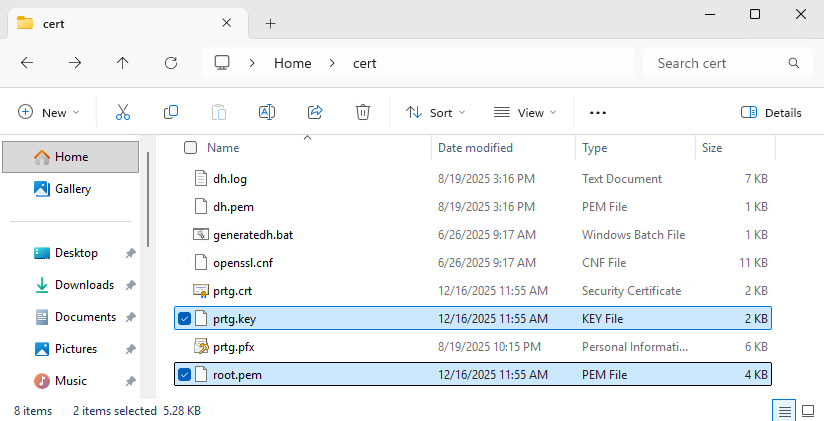
.\prtgacmebot.ps1 -CertName prtg.yourdomain.ch -ContactEmail hello@yourdomain.ch -DaysBeforeExpiration 30This should create a new certificate in your local computer personal store and generate its derived files prtg.pem, prtg.key in the following path «C:\Program Files (x86)\PRTG Network Monitor\cert».

Create a new basic task and define how often to run it, we recommended running it at night since the script restarts the PRTG service upon renewing the certificate.
The action could look like this:
- program/script:
powershell.exe
- Add arguments:
.\prtgacmebot.ps1 -CertName prtg.yourdomain.ch -ContactEmail hello@yourdomain.ch -DaysBeforeExpiration 30
- Start in:
C:\YourPath - Run whether user is logged on or not.
Run the task and check prtgacmelog.txt if everything worked as expected. The script should do the following:
- Get a new certificate if none has been issued for the domain so far.
- Renew the existing certificate if certificate validity in days is below your threshold «DaysBeforeExpiration».
- Export the certificate and create the cert files in the correct format for PRTG.
- Restart the PRTGCoreService if a new certificate was installed.
Changing the API key in store
To change the API key, run the following:
Unlock-SecretStore -Password (Import-Clixml -Path "$env:LOCALAPPDATA\PoshACME\passwd.xml")
$newApiKey = Read-Host -Prompt 'Enter your new API key'
Set-Secret -Name HosttechToken -Secret $newApiKey
Schreiben Sie einen Kommentar