
We are using Confluence a lot for our documentations and therefore it’s an important tool for us. And as much as we trust Atlassian to manage their stuff and not lose any data, we still prefer to have a backup in our hands.
So we did some research on how to backup Confluence as automated as possible. In the Confluence-Admin there’s a way to manually trigger and download the backups at the following site: /wiki/plugins/servlet/ondemandbackupmanager/admin, looking like this:
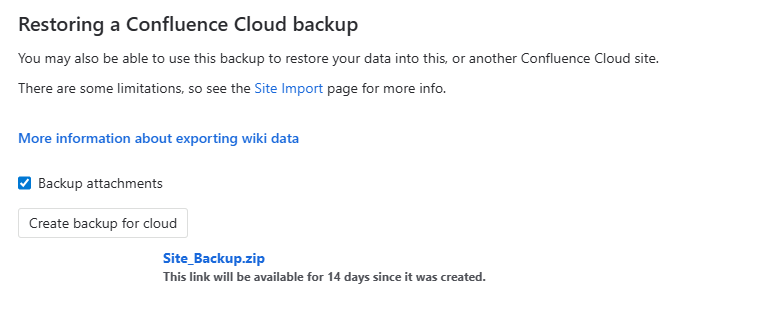
While this of course works, it’s not feasible to trigger and download the backups manually, especially because it takes a good half an hour to create the backup. So we looked around and stumbled upon the following script backup-confluence-api-token.ps1, which looked promising. But as there is no official documentation from Atlassian, it looks like some reverse-engineered information without any official support.
Available endpoints
We dug into the APIs and there are two main endpoints:
POST: /wiki/rest/obm/1.0/runbackup:Trigger a new backupGET: /wiki/rest/obm/1.0/getprogress: Get the progress of an already triggered backup
Known limitations
There are some limitations from the API that need to be considered:
- No offical support: There seems to be no offical documentation (and as of that) no official support
- Maximum of one backup every 24 hours: after you have triggered a Backup, you need to wait 24 hours until you are able to create the next one.
Authentication
Confluence/Atlassian supports two ways of authentication:
- Basic Auth
- OAuth
We have not been able to connect using OAuth with granular permissions which would have been preferred. So we had to fall back to an API Token without scopes and with Basic Authentication (Username, Secret).
Create a backup
To create a new backup, we will need to send a POST request to the endpoint /wiki/rest/obm/1.0/runbackup with the following body, where cbAttachments refers to whether you want to export Attachments or not. exportToCloud has to be set to true, when exporting from Confluence Cloud.
{
    "cbAttachments": true,
    "exportToCloud": true
}This endpoint then either returns something like this, if the Backup could be sucessfully initiated:
Backupisalreadyinprogress.CloudHistory{
  cloudId='6c7a6f55-.....-08edb3a15371',
  status='QUEUED',
  backupId='mplus-376919eb-....-75329a198259',
  creationTime='2026-03-25T08: 35: 32.398721536Z',
  lastModifiedTime='2026-03-25T08: 35: 32.398721536Z',
  hasAttachments=true
}As mentioned above, there is a limit of one backup every 24 Hours. If you try to create a backup during that time, you get an HTTP 406 response, with the following error in the body:
Backupfrequencyislimited.Youcannotmakeanotherbackuprightnow.Approximatetimetillnextallowedbackup: 4hoursand2minutesCheck the status and download the backup
Once you have triggered the backup you can check the status with get GET request to the following URL: /wiki/rest/obm/1.0/getprogress
Right after the backup has been initiated, the endpoint returns something like this:
{
  "size": 0,
  "concurrentBackupInProgress": false,
  "time": 0,
  "isOutdated": false
}And after a while, you see that it’s processing and it returns the percentage (which is not very accurate). This lets you track the state of the Backup duiring creation. In our case, it takes about 30 Minutes to create the backup resulting in a 10 GB file.
{
  "size": 0,
  "currentStatus": "PROCESSING",
  "alternativePercentage": "0",
  "concurrentBackupInProgress": false,
  "time": 1774002187647,
  "isOutdated": false
}And if nothing goes wrong and you are patient enough, you get the following response. So oyu can see the Status is COMPLETE percentage is at 100 and the File Name appears. This is the URL where you can download the Backup from.
{
  "fileName": "temp/filestore/f414ec92-....-c3fb80968852",
  "size": 0,
  "currentStatus": "COMPLETE",
  "alternativePercentage": "100",
  "concurrentBackupInProgress": false,
  "time": 1774004016420,
  "isOutdated": false
}We have also encountered some issues during the backup, where we got a FAILED Status at a random percentage:
{
  "size": 0,
  "currentStatus": "FAILED",
  "alternativePercentage": "66",
  "concurrentBackupInProgress": false,
  "time": 1774002187647,
  "isOutdated": false
}Automation
With the information that we’ve acquired from the Endpoints, we’re able to build a PowerShell Script and run that in an Azure Function.
We’ve build the Function to Read the secrets from a KeyVault using a Managed Identity and and stores the backups on an Azure Files share mounted to the function runtime.
This then resulted in the following script with some error handling:
param($Timer)


$ErrorActionPreference = "Stop"

# Track overall execution time
$overallStartTime = Get-Date

#See how to create an API token: https://support.atlassian.com/atlassian-account/docs/manage-api-tokens-for-your-atlassian-account/
$domain = "yoursite.atlassian.net"
$destination = "/mnt/backups" # Location on server where script is run to dump the backup zip file.

$timeoutSeconds = 3600
$downloadTimeoutSeconds = 900

if (-not (Test-Path Env:$KEYVAULTNAME)) {
    $ErrorMessage = "missing KEYVAULTNAME environment variable"
    Add-Log $ErrorMessage
    throw $ErrorMessage
}

$KeyVaultName = $ENV:KEYVAULTNAME
Add-Log "Retrieving API credentials from Key Vault '$KeyVaultName'"
$ConfluenceApiUserName = Get-AzKeyVaultSecret `
    -VaultName $KeyVaultName `
    -Name "ConfluenceApiUserName" `
    -AsPlainText

$ConfluenceApiUserSecret = Get-AzKeyVaultSecret `
    -VaultName $KeyVaultName `
    -Name "ConfluenceApiUserSecret" `
    -AsPlainText

Add-Log "Successfully retrieved credentials from Key Vault"

# Basic Authentication (email:api-token)
# See: https://developer.atlassian.com/cloud/confluence/basic-auth-for-rest-apis/
$auth = [System.Convert]::ToBase64String([System.Text.Encoding]::UTF8.GetBytes("${ConfluenceApiUserName}:${ConfluenceApiUserSecret}"))
$headers = @{
    "Authorization"      = "Basic $auth"
    "Content-Type"       = "application/json"
    "Accept"             = "application/json"
    "X-Atlassian-Token"  = "no-check"
}

# Check of destination folder, create is missing
if (!(Test-Path -Path $destination)) {
    $ErrorMessage = "Export folder is not present: $destination"
    Add-Log $ErrorMessage
    throw $ErrorMessage
}

# Set body
$body = @{
    cbAttachments = "true"
    exportToCloud = "true"
}
$bodyjson = $body | ConvertTo-Json

# Set Atlassian Cloud backup endpoint
$backupEndpoint = "https://$domain/wiki/rest/obm/1.0/runbackup"
$backupStatusURL = "https://$domain/wiki/rest/obm/1.0/getprogress"


# Create a Confluence Cloud backup
Add-Log "Initiating Confluence Cloud backup for $domain"
$backupCreationStartTime = Get-Date
try {
    $backupResponse = Invoke-WebRequest `
        -Method "POST" `
        -Uri $backupEndpoint `
        -Headers $headers `
        -Body $bodyjson

    Add-Log "Backup creation request successful. Waiting for backup to complete..."
}
catch {
    $statusCode = $_.Exception.Response.StatusCode.value__
    $errorBody = $_.ErrorDetails.Message

    if ($statusCode -eq 406 -and $errorBody -match "Backup is already in progress") {
        $ErrorMessage = "A backup is already in progress. Waiting for it to complete..."
        Add-Log $ErrorMessage
        throw $ErrorMessage
    }

    if ($statusCode -eq 406 -and $errorBody -match "(\d+)\s*hours?\s*and\s*(\d+)\s*minutes?") {
        $hours = [int]$Matches[1]
        $minutes = [int]$Matches[2]
        $nextBackupTime = (Get-Date).AddHours($hours).AddMinutes($minutes).ToString("yyyy-MM-dd HH:mm")

        $ErrorMessage = "Error: Backup frequency limited. Next backup allowed in $hours hours and $minutes minutes (approximately $nextBackupTime)."
        Add-Log $ErrorMessage
        throw $ErrorMessage
    }

    $ErrorMessage = "Error: Failed to create Confluence backup. Status code: $statusCode - $errorBody"
    Add-Log $ErrorMessage
    throw $ErrorMessage
}

# Wait for the backup to be ready
$backupReady = $false
$startTime = Get-Date

while (!$backupReady) {
    $elapsedSeconds = ((Get-Date) - $startTime).TotalSeconds

    if ($elapsedSeconds -gt $timeoutSeconds) {
        $ErrorMessage = "Error: Backup timeout. No completion after $($timeoutSeconds / 60) minutes."
        Add-Log $ErrorMessage
        throw $ErrorMessage
    }

    Add-Log "We're waiting 60 seconds to check the status of your backup."
    Start-Sleep -Seconds 60
    # Get Backup Session ID
    $backupStatus = Invoke-WebRequest -Method "GET" -Headers $headers $backupStatusURL
    $statusResponse = $backupStatus
    $statusContent = $statusResponse.Content | ConvertFrom-Json
    $backupStatusOutput = $statusContent.alternativePercentage
    $currentStatus = $statusContent.currentStatus

    # Check if backup failed
    if ($currentStatus -eq "FAILED") {
        $ErrorMessage = "Error: Backup failed with status FAILED."
        Add-Log $ErrorMessage
        throw $ErrorMessage
    }

    # Check if backup is complete via currentStatus or alternativePercentage
    if ($currentStatus -eq "COMPLETE" -or $statusContent.alternativePercentage -eq "100") {
        $backupReady = $true
    }

    Add-Log "Current backup status is $currentStatus - $backupStatusOutput%"
}

$backupCreationEndTime = Get-Date

# Identify file location to download
Add-Log "Backup complete. Preparing download..."
$parseResults = $backupStatus.Content | ConvertFrom-Json
$backupLocation = $parseResults.fileName
# Download the backup file
$backupUrl = "https://$domain/wiki/download/$backupLocation"

Add-Log "Downloading backup from $backupUrl"
$backupFilename = "confluence-backup-$(Get-Date -Format "yyyyMMdd").zip"
$fullBackupPath = Join-Path -Path $destination -ChildPath $backupFilename
$backupDownloadStartTime = Get-Date
Invoke-WebRequest `
    -Method "Get" `
    -Uri $backupUrl `
    -Headers $headers `
    -OutFile $fullBackupPath `
    -TimeoutSec $downloadTimeoutSeconds

$backupDownloadEndTime = Get-Date
Add-Log "Backup saved as $backupFilename"

# Calculate and log statistics
$backupFilePath = $fullBackupPath
$backupFileSize = (Get-Item $backupFilePath).Length
$fileSizeInMB = [math]::Round($backupFileSize / 1MB, 2)

$totalDuration = (Get-Date) - $overallStartTime
$backupCreationDuration = $backupCreationEndTime - $backupCreationStartTime
$backupDownloadDuration = $backupDownloadEndTime - $backupDownloadStartTime

Add-Log ""
Add-Log "========== Backup Statistics =========="
Add-Log "Total Duration: $($totalDuration.ToString("hh\:mm\:ss"))"
Add-Log "Backup Creation Duration: $($backupCreationDuration.ToString("hh\:mm\:ss"))"
Add-Log "Backup Download Duration: $($backupDownloadDuration.ToString("hh\:mm\:ss"))"
Add-Log "Backup File Size: $fileSizeInMB MB"
Add-Log "======================================="
And, if everything works well, you will get the following output from a run:
2026-03-31 22:35:31 Successfully retrieved credentials from Key Vault
2026-03-31 22:35:31 Initiating Confluence Cloud backup for yoursite.atlassian.net
2026-03-31 22:35:32 Backup creation request successful. Waiting for backup to complete...
2026-03-31 22:35:32 We're waiting 60 seconds to check the status of your backup.
2026-03-31 22:36:32 Current backup status is PROCESSING - 0%
2026-03-31 22:36:32 We're waiting 60 seconds to check the status of your backup.
2026-03-31 22:37:33 Current backup status is PROCESSING - 0%
2026-03-31 22:37:33 We're waiting 60 seconds to check the status of your backup.
.....
2026-03-31 23:04:42 Current backup status is PROCESSING - 0%
2026-03-31 23:04:42 We're waiting 60 seconds to check the status of your backup.
2026-03-31 23:05:43 Current backup status is COMPLETE - 100%
2026-03-31 23:05:43 Backup complete. Preparing download...
2026-03-31 23:05:43 Downloading backup from https://yoursite.atlassian.net/wiki/download/temp/filestore/f414ec92-....-c3fb80968852
2026-03-31 23:16:03 Backup saved as confluence-backup-20260325.zip
2026-03-31 23:16:03
2026-03-31 23:16:03 ========== Backup Statistics ==========
2026-03-31 23:16:03 Total Duration: 00:40:33
2026-03-31 23:16:03 Backup Creation Duration: 00:30:12
2026-03-31 23:16:03 Backup Download Duration: 00:10:20
2026-03-31 23:16:03 Backup File Size: 10286.22 MB
2026-03-31 23:16:03 =======================================
Schreiben Sie einen Kommentar